80/100 · Proceed
Fit Review
Score the role before spending time on a full pack.
Role-fit, positioning and application packs
Upload your CV, paste a job description, define your positioning, run a fit review, then generate an ATS-aware application pack. Pro users can add the Autopilot Agent as a paid add-on: a premium workflow that can queue approved jobs, score them against your criteria, prepare applications, notify you after runs and track submission outcomes.
86/100
sample fit score
5 templates
ATS to executive
Autopilot
Pro feature

Discover what you can create
ApplyPilot turns your real evidence into focused outputs you can review, download and track.
Score the role before spending time on a full pack.
Choose from ATS, executive, elegant, professional and photo formats.
Generate a concise, role-specific letter grounded in your CV.
Save packs, notes, status, links, follow-ups and salary details.
Pro users can queue jobs, score matches, prepare applications and track submission outcomes.
Pro feature
Autopilot turns ApplyPilot Pro from a single-application pack generator into a controlled job-search workflow. Configure your target roles, companies, approved sources, seed CV and application identity once. Then run the agent on demand or schedule it to process suitable jobs, prepare applications and record what happened.
Run Now or scheduled daily: choose whether the agent runs only when you click a button, every day, or both.
Approved-source discovery: Autopilot only works from job URLs and domains you configure. No broad scraping, no login bypass and no CAPTCHA bypass.
Controlled preparation: shortlisted jobs can become prepared applications with CV, cover letter, recruiter message, readiness checklist and run logs.
Premium tracking: every run records jobs discovered, jobs scanned, applications prepared, failures, warnings, notifications and supported submit outcomes.
Agent settings
Set roles, companies, source URLs, daily run time and preparation limits.
Company allowlist
Restrict Autopilot to selected companies, plus custom companies through Other.
Approved discovery
Import only from URLs/domains the user has explicitly configured.
Auto-prepare
Prepare applications from shortlisted jobs while keeping final review under user control.
Notifications
Email a run summary after the agent completes when Resend is configured.
Supported submit
Limited email-to-recruiter flow only; no unsupported job-board submission.
Define the role narrative before writing so the pack selects and compresses the most relevant evidence.
Check role suitability, must-have requirements, CV evidence and major gaps before using a full pack generation.
Choose ATS Friendly, Executive Modern, Elegant Simple, Professional or Professional Photo before downloading.
Pro users can add jobs to an Autopilot queue, score them against their seed CV and criteria, prepare applications, and track submission outcomes.
A constraint system, not a generic template
ApplyPilot is designed to select and frame real evidence, not invent experience. It flags weak evidence, avoids fake claims and gives users a final checklist before submission.
Reader-compliant, not ATS gaming
ApplyPilot helps users create CVs that are clean, searchable and easy for recruiters to skim. It uses job language naturally, checks role fit and highlights gaps without fake ATS promises, white-font tricks or keyword stuffing.
Check whether the target role fit, first-page impact and evidence are clear to a busy recruiter.
Explain career transitions or mismatched titles without exaggerating the candidate’s background.
No hidden keywords, no invented experience and no fake ATS score claims — just clearer evidence.
Built for real job-search moments
These are illustrative scenarios, not customer reviews. Real testimonials will be added only after beta users give permission.
“I have not applied for jobs in years and need help turning my experience into a current, role-specific application.”
Illustrative use case
“I need to position the same background differently for business analysis, product, data governance and transformation roles.”
Illustrative use case
“I want to know whether a role is worth applying for before spending hours rewriting my CV and cover letter.”
Illustrative use case
“I need to show transferable evidence clearly without pretending I have experience I do not actually have.”
Illustrative use case
“I need quick, polished packs for multiple contract roles while keeping track of rates, recruiters and follow-ups.”
Illustrative use case
“I need help compressing 10–20 years of experience into a focused CV that matches the role instead of listing everything.”
Illustrative use case
Video walkthrough
A short 2–3 minute walkthrough showing how to upload or build a CV/profile, import a job description from a link, run fit review, generate a tailored application pack, choose a CV template and save the role to your tracker.

2–3 minute walkthrough
Opens in a new tab to avoid browser or YouTube embed restrictions.
Product demo
A guided, video-style walkthrough shows how ApplyPilot moves from CV upload or profile building, to job-link import, positioning, fit review, generated drafts, 6 CV output options and tracker management.
Step 1 of 11
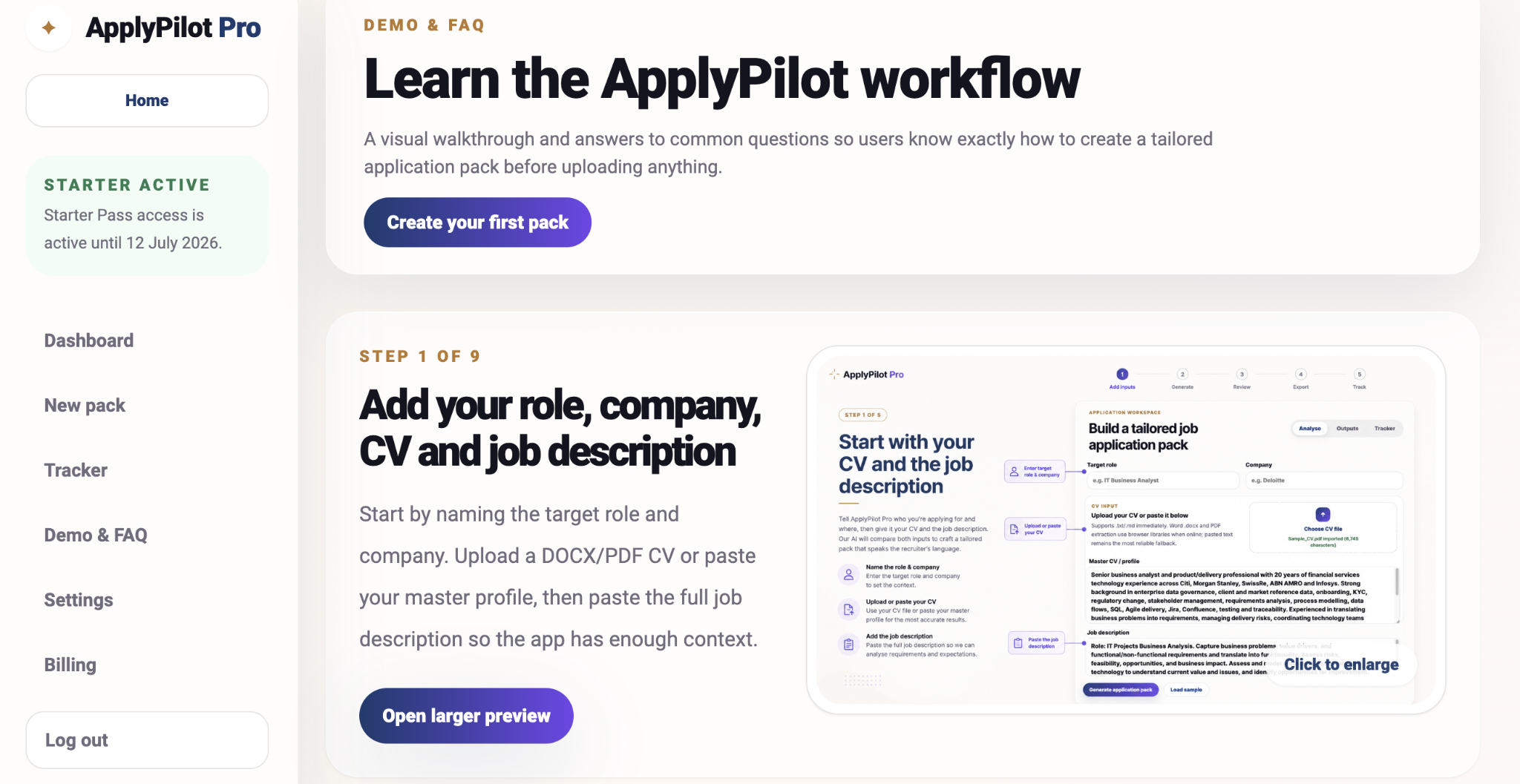
Accurate inputs lead to stronger match insights and more relevant application drafts.
Pricing
Start free, try a low-commitment pass, or choose monthly/annual Pro when you want the full workflow — including the premium Autopilot option.
Try ApplyPilot
Includes:
15 days, no auto-renewal
Everything you need:
For active job search
Everything you need:
Best value
Everything you need:
Autopilot Agent add-on pricing
Add Autopilot Agent to Pro Monthly for +£5/month, or to Pro Annual for +£36/year. This protects the service from high-volume daily automation costs while keeping the core Pro plan affordable.
Pro Monthly and Pro Annual include a 3-day money-back guarantee for first subscription payments, subject to fair use and feedback. Starter Pass is a one-time access pass and does not auto-renew.
Yes. The tracker lets you update each saved application with status, notes, recruiter/contact, salary or rate, location, job link and follow-up date.
No product can honestly guarantee that. ApplyPilot is ATS-aware: it helps align your CV wording and evidence to the job description, while avoiding fake claims or keyword stuffing.
Autopilot Agent is the premium Pro add-on workflow for users who want more than one-off application packs. It can queue jobs, score them against your settings and seed CV, prepare applications, run readiness checks, keep run logs, send notifications and track submission outcomes.
Yes. Pro users can configure the Autopilot Agent for manual Run Now, scheduled daily runs, or both. Scheduled runs use the user’s saved settings, approved sources, target companies, limits and safety controls.
Only from approved sources configured by the user. It is designed for controlled approved-source discovery, not broad scraping, login bypass, CAPTCHA bypass or unsupported job-board automation.
The standard product prepares packs for you to review and submit. Pro Autopilot goes further: it can queue jobs, score matches, prepare applications, run readiness checks, send run notifications and track submission outcomes. Limited supported submit flows are deliberately narrow, such as email-to-recruiter, and remain controlled by user settings.
Yes. The production app is designed to support CV uploads, extract text and store reusable CV profiles.
No. The product guardrail is to use only provided evidence and flag gaps honestly.
In the production app, authenticated user data is stored in Supabase with row-level security policies.
Feedback
ApplyPilot is built for real job seekers, so honest feedback matters. Tell us what felt useful, what felt confusing, what broke, or what would make the product genuinely save you more time.
Our promise
We read every message. We will not treat feedback as noise — early user feedback directly shapes what gets fixed, simplified and built next.
Legal and trust